Sunday, July 21, 2013

Update To My ATX Bench Power Supply

DSCF1115
I needed (wanted, procrastinating other work) to test some PC fans the other day and the easiest way was to use my ATX Bench Power Supply and snake one of the molex connectors out through the gap in the back of the enclosure. It sure was ugly though.

DSCF1116
I ordered one of these 3.5” bay adapters from Monoprice just for the power cable.

DSCF1118
I should look on Ebay for these…

DSCF1121
Some front panel filing…

DSCF1123
And now I have a convenient plug.

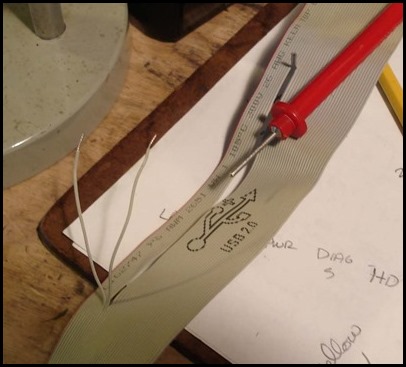
DSCF1124
I was thinking of adding the USB connector too but decided against it.

DSCF1132
Spinning a fan.

Wednesday, July 10, 2013

Using a Dell Optiplex 745 Motherboard in a Dell Dimension 5100 Case.

Give a guy an empty case and he’ll think it’s a PC
My previous workstation was a Dell Dimension 5100 I bought in 2006. When I upgraded to my current machine (Dell Studio XPS 8100) in 2010, the 5100 was consigned to a shelf. Note to self: this means you can justify upgrading your desktop PC next year. It sports a Pentium 4 single core processor which really isn’t up to much these days. I hated to let the machine languish so I looked into upgrades and found that some people had installed Pentium D dual core processors. I tried it and it worked but had an annoying message about the processor being unsupported and I had to hit F1 every time I booted up. The Pentium D is the worst dual-core processor (unless used as a space heater), so the performance gain wasn’t that great.
Then a month or so ago I reanimated a used Dell Optiplex 745. It supports Core2Duo processors with a 1066MHz FSB, which is still somewhat limited but far zippier than a P4. It also has Gigabit LAN, etc. Long story short I bought a spare 745 motherboard for $18.00 on Ebay. I had a Pentium Dual core e2200 laying around surplus to my needs (it’s about twice as capable as a Pentium D in spite of the low amount of cache and clock speed). I proceeded to cram the 745 motherboard into the 5100 case.
Did I mention that the whole hassle arose because Dell chose to use the BTX form factor during this period? Yeah, that’s right, an ATX motherboard will not fit. If it had been ATX/micro ATX I would have had a wide array of motherboards to use.
DSC03429
I did have to nibble out the I/O plate (which is not removable) to fit the different I/O configuration. It’s ugly but what the heck, the alternative was not doing it at all. Did I mention that this whole project is a monumental waste of time?
DSC03432
The front panel connection is identical however.
DSC03412
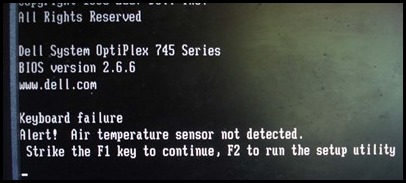
When I booted up I was more than irritated to see this message. Once I hit F1 to boot the fan ran at 100% speed (think small turbojet engine), making the machine way too noisy for general use. It ran at this rate even with the operating system running. I did boot into Linux, perhaps Windows controls this better, although being a Dell I doubt it. They often have weird hardware overrides in their various BIOS-es. Like the irritating one that detects that you’re using a non-Dell charger on your laptop and throttles CPU speed.
DSC03416
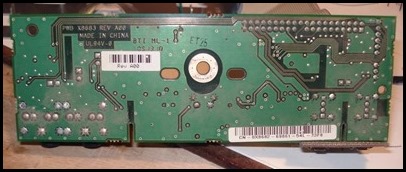
Optiplex 745 front panel board top.
DSC03418
Bottom.
DSC03423
If you look closely at the top you can see what I believe is a nickel thin film resistance temperature detector.
DSC03403
Dimension 5100 board, top. There are some interesting unpopulated pads on the board. But I’m not going to add an air temperature sensor.
Why? Because the whole notion is incredibly stupid. All the sensor is measuring is the temperature of the room air entering the case. If the PC overheats because of ambient air temperature then something has gone seriously awry in the case design. It might make sense if the sensor was inside the middle of the case, or maybe up top by the power supply.
DSC03401
Bottom.
DSC03396
Off to the bench for some poking and prodding. The microscope was of help.
DSC03398
Pins identified.
DSC03424
The scrawl of a madman.
DSC03400
Wires identified, cut and stripped. I then added female connectors to them.
DSC03407
I hooked a 5k potentiometer up to the wires and tried different resistances. Of interest is that adjusting the potentiometer once the machine had booted did not seem to cause any sort of fan speed adjustment, so I had to boot repeatedly. It was also quite sensitive with a small range of resistances being acceptable. I wanted a relatively quiet fan speed. In theory the processor temperature should dictate fan speed once the PC is running.
DSC03436
I settled on a 3.3K Ohm resistor.
DSC03438DSC03440
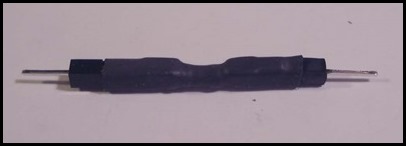
Made a little pluggable unit just in case I need to swap it out.
DSC03442
Installed.
DSC03434
Anyway now it boots up fine with no sensor warning and the fan doesn’t run full bore. As a bonus the existing XP install booted up fine on the Optiplex board. A couple of missing drivers but that’s easily taken care of. At least I kept it out of the landfill…

Friday, June 14, 2013

Geoguessr

Ok, I have no power over my compulsion to play Geoguessr. The game is insanely addictive for people of a certain type. I found out about it through xkcd:


This shows one of the pitfalls of the game. This experience is nowhere near as uncommon as you would think.

bestgeoguessr
This is my best score so far, using every cheat imaginable (basically Google) and having some luck as to initial location. If you want to try to beat the score (stop looking at the map!), click here. Yes, the game has a challenge mode…and it now has a timed mode which I haven’t tried. If you’re feeling particularly smart you can try staying in place just spinning around to determine where you are. This is much harder as Finland looks a lot like Minnesota and Australia looks like Botswana. Also the Canary Islands exist. I can score around 12000 points if I’m lucky in that mode.

My tips so far:

  • Unless you speak Russian you will need to have a cyrillic character map open to translate signs as you wander around, even though they don’t have many actual street signs. Thankfully I know hirigana and katakana.
  • Portugese is spoken in a many places that are not contiguous.
  • It sucks to be plunked down in a desolate stretch of outback. You may get carpal tunnel clicking for miles until you see a sign of some sort.
  • Google streetview still has some very low resolution sections. This makes the game a lot harder as you need to find really big landmarks.
  • Sometimes the cameras are dirty.
  • The interior of China and most of Africa and South America (with the exception of South Africa and Botswana, Brazil and Venezuela) isn’t mapped yet.
  • Svalbard has been mapped.

I almost had to do work this morning as the Geoguessr site was down, but it’s up now so I’ll stop typing and start playing. It’s educational! Really.

Saturday, June 08, 2013

A Few Yard Sale Finds

I ran around Philomath this morning and bought a few things.
DSC03228
Apparently I collect vintage electronic test equipment now.
DSC03231DSC03233
This radio is awesome. A Panasonic R-77 AM Calendar Radio.
bluebooks
I haven’t come across Little Blue Books before.
chopstick
I’m also starting a new hobby, vintage restaurant chopstick collecting…
I’m kidding, I use chopsticks in the shop for all sorts of tasks. I always buy them when they’re cheap at yard sales.
DSC03246An Atlas 10” lathe steady rest, needs a few parts (easily made) and some rust abatement. I may actually put in on Ebay. I need to sell more of my treasures.

Saturday, May 25, 2013

Replaced the Capacitors on a XFX Geforce 8600 GT

DSC03206
I bought three of these at the computer bonanza yard sale last year. One didn’t work. I threw it in a box and forgot about it. Then I needed a graphics card. They aren’t bad cards for general use. I figured it was worth half an hour and a couple of bucks worth of capacitors* to see if I could get it working.

DSC03207
This is why it didn’t work. Exploded FZ brand capacitors. They are known to go bad and many people took advantage of XFX’s lifetime warranty on these cards. I don’t have that option. Notice also that they are through-hole capacitors on a card that could have taken higher quality solid surface mount capacitors (the PCB had both options). Likely a bean counter at XFX saved the company 30 cents, then lost tens of dollars on the warranty.

DSC03208
DSC03209
These FZ caps look ok but I’ll replace them as well.

DSC03210
Bye-bye. I did the standard heat, glob some solder on and wiggle method of removal.

DSC03211
I ordered new caps (1000, 1500 and 470 mF, 6.3V for the first two and 16V for the last) from Mouser and had a few already from Jameco. 105 deg. C, low ESR. The black ones are Panasonic.

DSC03212
Caps in place.

DSC03213
Soldered them in. The card works, at least for the last 12 hours it has.


*It always ends up being around $20, because you buy a bunch of other crap at the same time, just because. In my case I ordered extra capacitors and a bunch of Attiny 45 microcontrollers.

Tuesday, May 07, 2013

75 Cent Surge Protector

DSC03099
I bought this surge protector/power strip at a yard sale for 75 cents. You can never have too many…unless you do. Unfortunately when plugged in, the two switched outlets didn’t work, nor did the little green light come on.
DSC03086
I opened it up and checked the fuses on the phone jacks, they were fine.
DSC03087
Checked the plug/buss (?) bars. They were fine.
DSC03088
Checked continuity between the middle pad with the black wire and the lower pad with the black wire. These are connected by the power switch. No continuity in either switch position!
DSC03090
Looked at the switch.
DSC03091
It wiggles. I don’t think it’s supposed to do that.
DSC03092
Ah, the leads from the switch are loose and the solder around them has cracked.
DSC03093
I just pulled the switch out (from the other side), leaving gaping holes.
DSC03096
I cleaned and tinned the switch leads, flowed some new solder around and mixed with the old. Got the switch leads hot from the other side as well in hopes of drawing solder up the via a bit. Wiped off a lot of the nasty flux mess.
DSC03097
Easiest way to test, and the switched outlets, switch.
DSC03102
Off…
DSC03103
On!